EM Component Transfers is used to transfer equipment components from one piece of equipment to another. This allows companies to track where components are installed, maintain accurate equipment records, and preserve component history when parts are moved or reassigned.
1-Go to Equipment Management>Programs>EM Component Transfers
2-On the Grid tab, you can view all components and the current equipment it is on
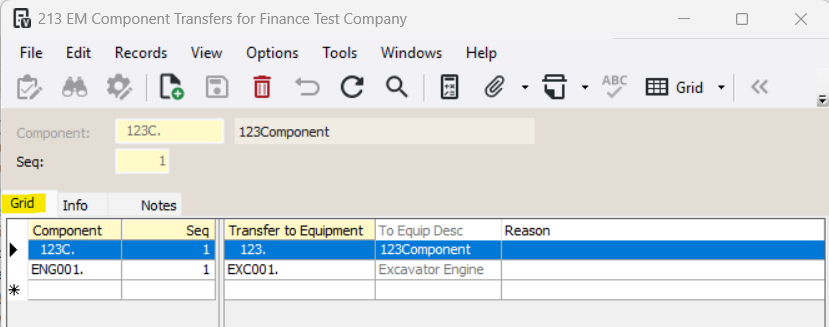
3-Select the component that is transferring and go to the Info tab
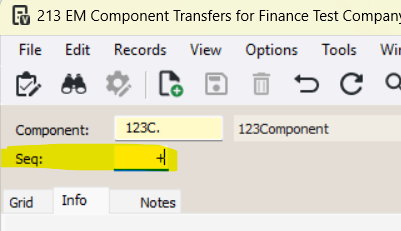
4-Enter 'N' or '+' in the Seq field
5-Enter the Transfer to Equipment and a Reason (optional)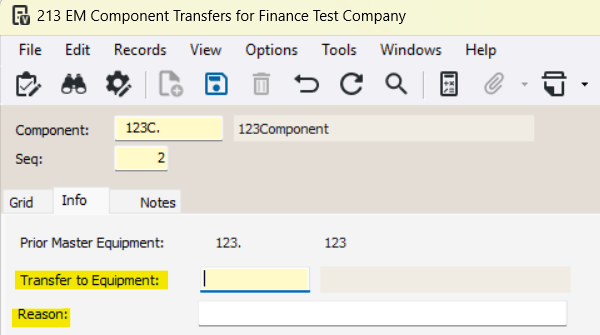
6-Enter the Date On, the day this component was transferred to the new equipment
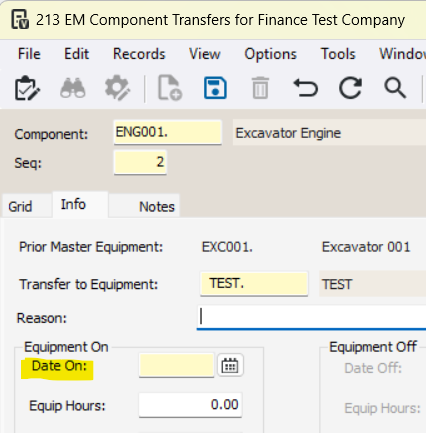
7-Press Save
To review historical component transfers, refer to the [EM] EM Component Transfers Report
Was this article helpful?
That’s Great!
Thank you for your feedback
Sorry! We couldn't be helpful
Thank you for your feedback
Feedback sent
We appreciate your effort and will try to fix the article