Attach Batch Reports to HQ Batch Control checkbox on the SM Company Parameters form, Info tab.
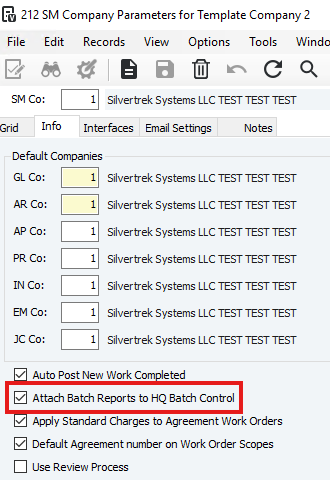
Purpose: Select this checkbox (recommended) to automatically save batch audit reports to the HQ Batch Control record when a batch is posted. Reports (except error reports) are exported as PDFs and stored according to the DM Attachment Options settings. You can later retrieve them from HQ Batch Control.
Posting Behavior: Reports are exported before the batch posts. If an error occurs while exporting, posting is stopped, and the error must be fixed before re-validating and posting the batch.
Security: If HQ Batch Control is secured, only users with access can view these attachments. Unlike regular attachments, batch report attachments cannot be searched via DM Attachment Search.
When to Skip: Do not select this checkbox if you do not want reports attached to HQ Batch Control.
Service Management (SM) Batches:
SM batches are processed automatically in the background and do not display the batch processing form.
Audit reports for SM batches can be retrieved from HQ Batch Control only if the “Attach Batch Reports to HQ Batch Control” checkbox is selected.
If Auto Post New Work Completed is enabled in SM Company Parameters, batches are automatically created, validated, and posted without user intervention, so attaching reports is the only way to review them.
Was this article helpful?
That’s Great!
Thank you for your feedback
Sorry! We couldn't be helpful
Thank you for your feedback
Feedback sent
We appreciate your effort and will try to fix the article