Accessing Batch Information without HQ Batch Control
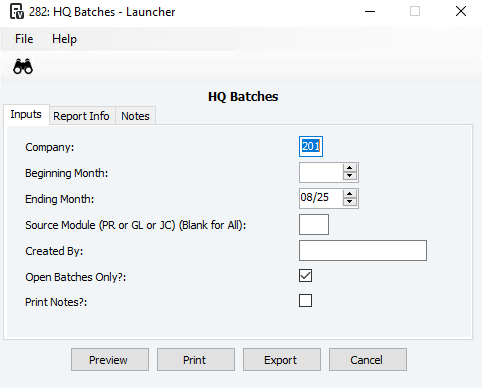
If you do not have access to HQ Batch Control, you may still be able to view batch information using the HQ Batches Report.
Steps:
Navigate to Headquarters → Reports and check if the HQ Batches report is available.
To run the report:
Enter a month or range of months.
Specify a source module (e.g., AP or JB), or leave blank to include all modules.
Enter a Created By user, using F4 to search for usernames, or leave blank.
Check Open Batches Only to return all batches with Status 0 through Status 4.
Check Print Notes? to include any notes, such as interface flag settings.
This report provides an alternative way to access batch details when direct access to HQ Batch Control is not available.
Was this article helpful?
That’s Great!
Thank you for your feedback
Sorry! We couldn't be helpful
Thank you for your feedback
Feedback sent
We appreciate your effort and will try to fix the article