GL Intercompany Accounts in Vista are used to define the GL accounts for transactions between companies. When one company pays an expense or records a transaction on behalf of another company, Vista uses the intercompany accounts to automatically create balancing entries between the companies.
1-Go to General Ledger>Programs>GL Intercompany Accounts
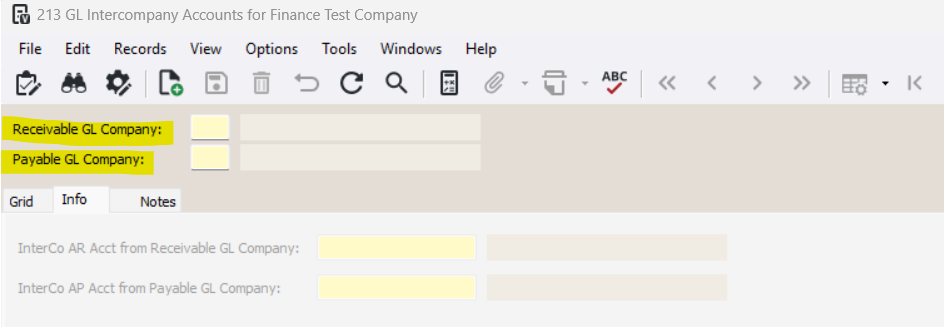
2-Enter the Receivable GL Company and the Payable GL Company
Receivable GL Company: Enter a GL company that will receive the accounts receivable side of a multi-company posting
Payable GL Company: Enter a GL company that will receive the accounts payable side of a multi-company posting.
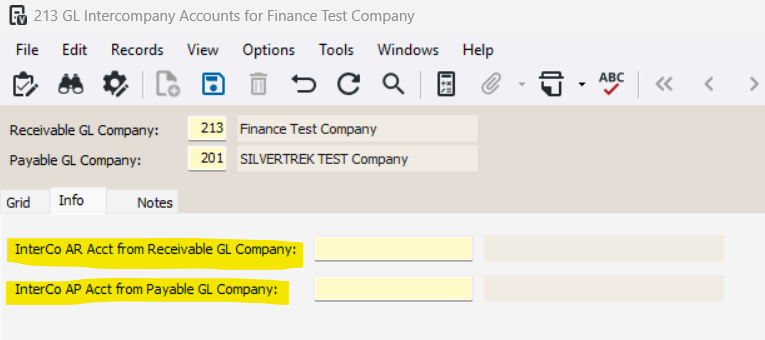
3-Enter the InterCo AR Acct from Receivable GL Company and InterCo AP Acct from Payable GL Company
InterCo AR Acct from Receivable GL Company: Enter a GL account that represents the intercompany accounts receivable in the Receivable company specified above.
InterCo AP Acct from Payable GL Company: Enter a valid GL account code that represents the intercompany accounts payable in the Payable company specified above.
Was this article helpful?
That’s Great!
Thank you for your feedback
Sorry! We couldn't be helpful
Thank you for your feedback
Feedback sent
We appreciate your effort and will try to fix the article