GL Account Parts in Vista are used to define the structure of your General Ledger account numbers. They allow you to divide GL accounts into different segments, such as company, department, division, or account.
1-Go to General Ledger>Programs>GL Account Parts
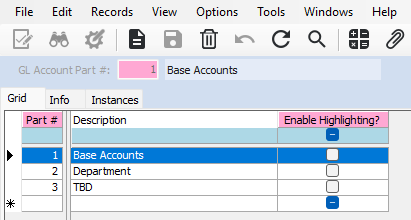
2-Select the Part # and go to the Instances tab
3-On the instances tab, ensure all the instances are assigned to a Major and Minor Category
Major Category: Identifies the main financial classification, such as Assets, Liabilities, Revenue, or Expenses. Allows you to group multiple GL accounts together under one main category for financial reporting.
Minor Category: Provides a more detailed breakdown within the Major Category, such as Cash, Accounts Receivable, or Payroll Expenses. Allows you to group multiple GL accounts together and display them as a single line on financial statements.
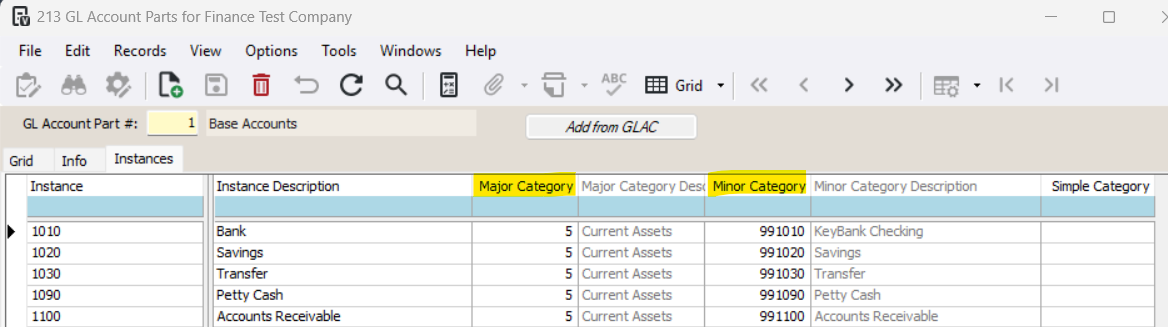
To assign the categories:
4-Find and select the GL account you are assigning

5-Click into the Major Category field and press F4 to select
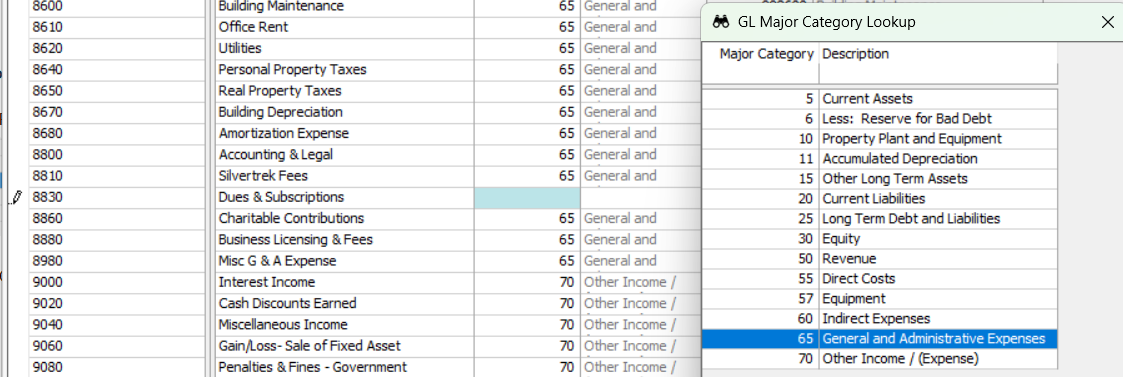
6-Click into the Minor Category field and press F4 to select

***To create new Major and Minor Categories view article here: [GL] GL Report Categories
Notes:
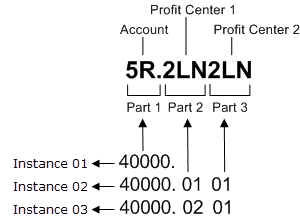
The standard format, if not changed during implementation, is 5R.2LN2LN. In this format:
Part 1 is the base account, which is the first 5-character right-justified part, followed by a period.
Part 2 is a 2-character left-justified profit center part. (Could be types of profit centers, such as division, department, or location)
Part 3 is a second 2-character left-justified profit center part. (Could be types of profit centers, such as division, department, or location)
Was this article helpful?
That’s Great!
Thank you for your feedback
Sorry! We couldn't be helpful
Thank you for your feedback
Feedback sent
We appreciate your effort and will try to fix the article