Use this form to set up the various control options for Project Management processing in a company.
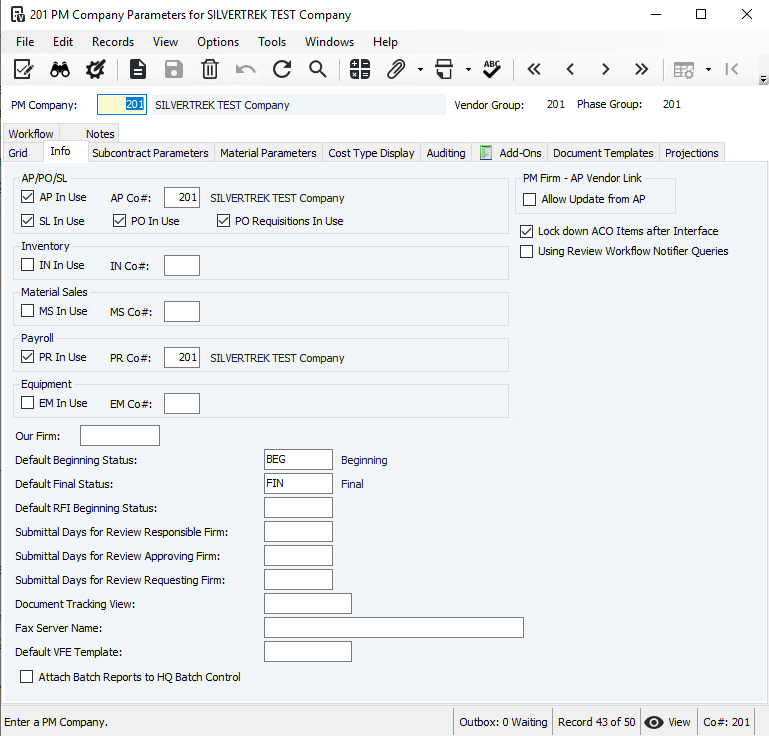
PM Company Setup
Before using Project Management, each company must be set up here. Setup choices affect PM forms, workflow, and related modules (Job Cost, Job Billing, Subcontract Ledger, Inventory, Material Sales, Requisitions). Only a system administrator should access this form.
Key Setup Options:
Default Document Templates
Company level: Assign templates for documents (e.g., RFIs) so all projects use the company’s default template.
Project level: Assign templates for specific projects; these override company templates.
Cost Type Display
Choose which cost types appear when adding project phases. Limit to relevant cost types to optimize screen space and performance.
Add-Ons
Set default add-on costs (overhead, profit, taxes, etc.) at the company level. Projects inherit these defaults for pending change orders.
Workflow
If using the Workflow module, assign workflows for the company. Company-level workflows override those set in HQ Company Setup.
Projections
Configure PM cost projections separately from JC cost projections. Changes in one do not affect the other.
Notes:
Changing setup options after use can impact processing or stored data—contact Support if unsure.
All changes (additions, deletions) are tracked in HQ Master Audit (HQMA).
Was this article helpful?
That’s Great!
Thank you for your feedback
Sorry! We couldn't be helpful
Thank you for your feedback
Feedback sent
We appreciate your effort and will try to fix the article