Setting Up Multiple Direct Deposit Accounts in Vista
Employees can split their net pay between multiple bank accounts. To do this, their Direct Deposit Status on the PR Employees form must be Prenote or Active.
- Open PR Employees and go to the Add'l Direct Deposits tab.
- Add a new record for each additional bank account.
- Enter the following information:
- Seq # – Controls the order deposits are made (lowest number is processed first).
- Routing Number and Bank Account Number.
- Account Type – C = Checking or S = Savings.
- Status
- P = Prenote (use for new accounts until verified by the bank)
- A = Active (after the bank verifies the account)
- I = Inactive
- Frequency – Determines when this deposit is made (leave as the normal payroll frequency unless a different schedule is needed).
- Method
- A = Fixed dollar amount
- P = Percentage of net pay
- Enter the Amount or Percentage, depending on the method selected.
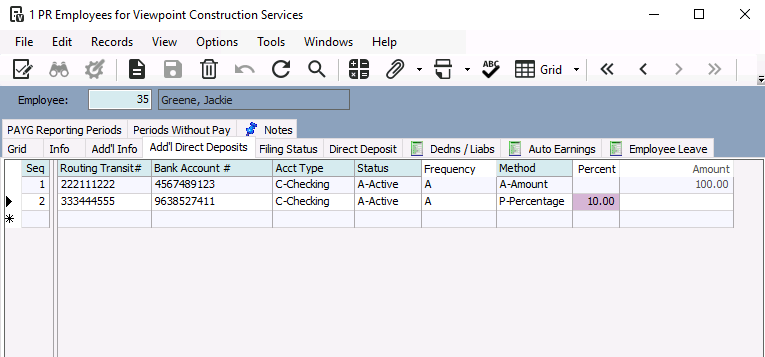
How it works:
- Vista processes deposits in sequence order.
- Fixed amounts and percentages are applied first.
- Any remaining net pay is deposited into the employee's primary direct deposit account on the Direct Deposit tab.
Example
- Seq 1: Deposit $100 to Savings.
- Seq 2: Deposit 10% of net pay to another account.
- Primary Account: Receives the remaining balance.
The calculated distributions can be reviewed (and temporarily edited) in PR Employee Pay Sequence Control after payroll is processed. If payroll is reprocessed, Vista recalculates the distributions automatically.
Was this article helpful?
That’s Great!
Thank you for your feedback
Sorry! We couldn't be helpful
Thank you for your feedback
Feedback sent
We appreciate your effort and will try to fix the article