This process enables Beginning Balances to be updated, allowing amounts to be included or excluded when the Beginning Balance Update modifies values.
Steps
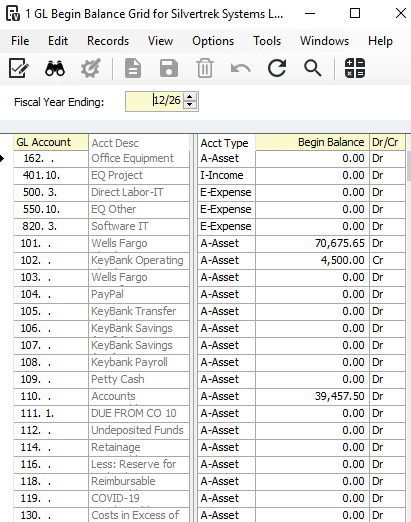
Access the GL Beginning Balances module: General Ledger → Programs.
Select the Current Fiscal Year.
Edit the Begin Balance column to enter the correct amount to be reflected at the start of the current fiscal year.
Save and close the form.
Cause:
GL Beginning Balance updates applied to multiple prior years can result in amounts from inactive GL accounts being carried forward into the current year’s Beginning Balances.
Was this article helpful?
That’s Great!
Thank you for your feedback
Sorry! We couldn't be helpful
Thank you for your feedback
Feedback sent
We appreciate your effort and will try to fix the article