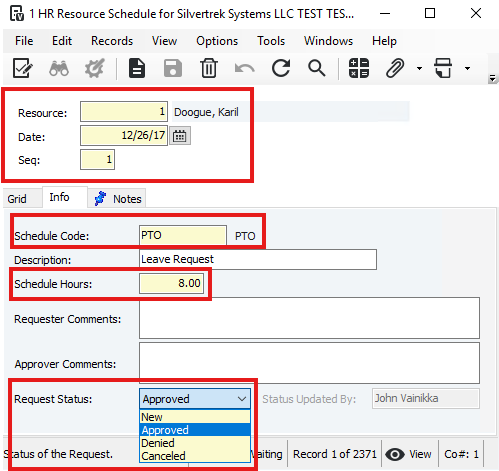
Open the HR Resource Schedule form from the Human Resources module.
- In the Resource field, press F4 to select the employee.
- Enter the Date of the leave.
- In the Schedule Code field, press F4 to select the type of leave.
- Provide a brief Description of the leave.
- Enter the Schedule Hours needed for the leave.
- Optional: Add comments in Requestor Comments or Approver Comments.
- Select the Request Status: New, Approved, Denied, or Canceled.
- Click Save.
Was this article helpful?
That’s Great!
Thank you for your feedback
Sorry! We couldn't be helpful
Thank you for your feedback
Feedback sent
We appreciate your effort and will try to fix the article