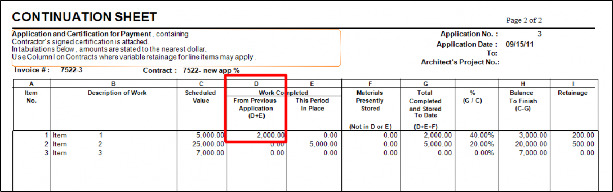
Move installed stored materials to Column D (From Previous Application) without using Column E.
Steps:
Create an interim bill (Never Interfaced):
Open a new bill for the contract.
Leave the Invoice field empty.
Set Status = N (Never Interfaced).
Record Installed Materials:
Enter the installed amount in the Items SM/Tax tab.
Enter the This Bill WC Amount on the Items tab.
Do not run the report for this bill.
This temporarily puts the installed amount in Column E.
Create a normal bill for the same contract:
Use the same Application # as the never interfaced bill.
Set Status = A (Active) and enter all other billed items as usual.
Run the Application for Payment report:
The installed amount from the never interfaced bill now appears in Column D (From Previous Application).
Summary:
The never interfaced bill acts as a placeholder for installed materials.
The following normal bill pulls that amount into Column D on the Continuation Sheet.
Was this article helpful?
That’s Great!
Thank you for your feedback
Sorry! We couldn't be helpful
Thank you for your feedback
Feedback sent
We appreciate your effort and will try to fix the article