A pre-note file can be generated and sent to your bank after entering the employee banking information in PR Employees on the Direct Deposit tab and selecting the Pre-Note radio button.
Key Points:
Generating a pre-note file does not require an open pay period.
The file contains no dollar amounts; it is used solely to verify the accuracy of the employee’s banking information with the bank.
Once the bank accepts the pre-note, change the employee’s status to Active to enable EFT processing for the next payroll.
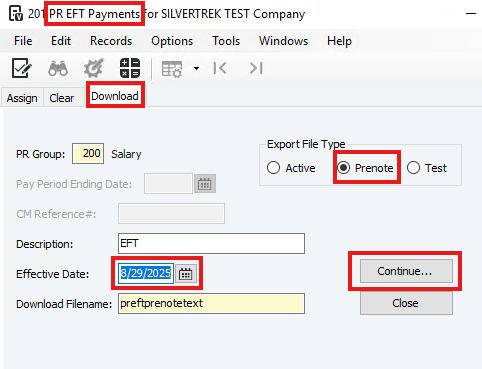
Steps to Generate a Pre-Note File
Navigate to PR EFT Payments.
Select the Download tab.
Choose the Pre-Note option.
Enter or select the Effective Date.
Click Continue.
Specify a name and location to save the file.
Submit the file to your bank.
Was this article helpful?
That’s Great!
Thank you for your feedback
Sorry! We couldn't be helpful
Thank you for your feedback
Feedback sent
We appreciate your effort and will try to fix the article