Use the SM Pay Types form to set up pay types that represent different labor costs for service work, such as regular time, overtime, or double time.
Pay types help estimate labor costs on work orders before payroll is processed. Actual payroll costs are updated to the work order after payroll is processed.
For each pay type, you must specify the cost method, factor, and earnings code, which will default when entering technician timesheets or timecards.
Cost Methods:
Multiplier: Calculates labor costs using the technician’s pay rate × factor × hours.
Dollar Rate: Uses a flat rate for labor, overriding the technician’s pay rate, multiplied by hours.
To set up pay types, go to the Programs menu in Service Management and open the SM Pay Types form.
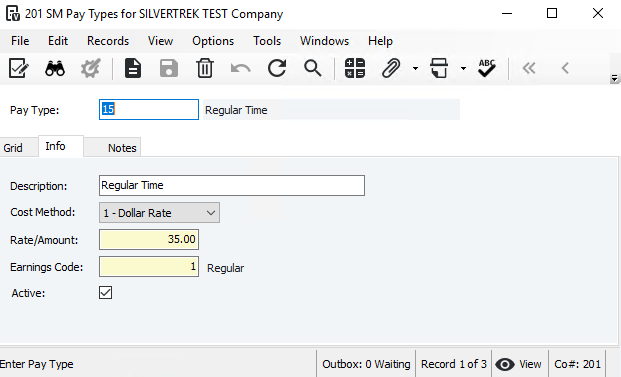
Pay Type: Enter a code for the pay level (e.g., REG, OT, DT, HOL).
Description: Enter a description of the pay type.
Cost Method: Choose Multiplier (0) or Dollar Rate (1). This determines how labor costs are calculated on work orders.
Multiplier: Enter a Factor (e.g., 1.00 = regular, 1.5 = time and a half, 2.0 = double time). The system multiplies this by the technician’s pay rate to get the Cost Rate.
Dollar Rate: Enter a Rate/Amount to override the technician’s pay rate.
Earnings Code: Enter the default earnings code for timesheets or timecards. Must be a valid code included for Remote Timesheet Entry. Press F4 to see a list of valid codes.
Active: Check to activate the pay type. Inactive pay types cannot be used or appear in lookups.
Was this article helpful?
That’s Great!
Thank you for your feedback
Sorry! We couldn't be helpful
Thank you for your feedback
Feedback sent
We appreciate your effort and will try to fix the article