Use the SM Serviceable Item Class form to create equipment classifications. Serviceable item classes define the categories and types of equipment maintained at service sites.
These classifications support reporting on productivity and profitability by class or type.
You can create multiple classes and types, but at least one class with one type is required.
After setting up classes, assign them to serviceable items in SM Service Sites (Serviceable Items tab).
To set up serviceable item classes:
Go to Service Management > Programs > SM Serviceable Item Class.

- Enter the Class (for example, Heating or Cooling Equipment).
- Enter a Description.
- Check Active to enable the class.
- Save the record.
- Set up at least one classification type for the class (required to assign it to serviceable items).
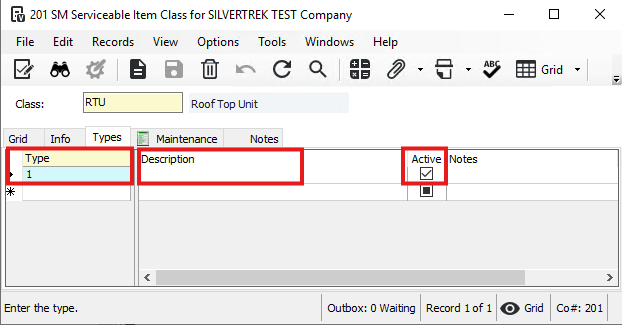
Open the Types tab.
Enter a Type (for example, Furnaces under Heating Equipment).
Enter a Description.
Check Active to enable the type.
Save the record.
Repeat to add more types if needed.
After setup, you can add maintenance for the class and assign the class and types to serviceable items at service sites.
Was this article helpful?
That’s Great!
Thank you for your feedback
Sorry! We couldn't be helpful
Thank you for your feedback
Feedback sent
We appreciate your effort and will try to fix the article