Use this form to create cost types, which classify the work where costs are posted on work orders.
After setup, you can assign these cost types to work completed lines in SM Work Orders.
How to access:
From the Programs menu in Service Management, open the SM Cost Types form.
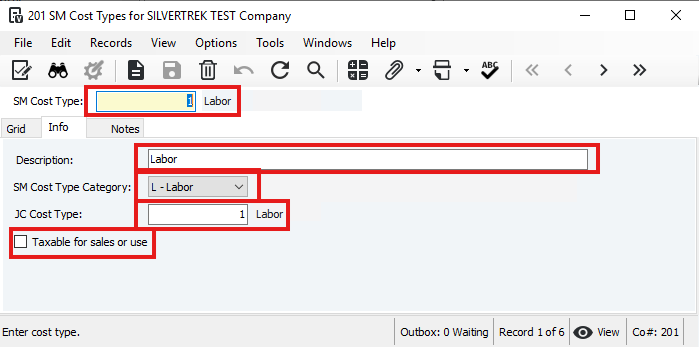
- SM Cost Type: Enter a number to identify the cost type.
- Description: Enter a description for the cost type.
- SM Cost Type Category: Choose one:
L = Labor
E = Equipment
M = Material
O = Other
S = Subcontracts
- JC Cost Type: Enter a default JC cost type for job work order lines.
- Taxable: Check if the cost type is taxable.
Note: Leaving it unchecked doesn’t prevent taxes if the material, site, or service center is taxable.
- Material Taxability (if M-Material and Taxable): Choose S (Sales), U (Use), or B (Both).
- Save the record.
Was this article helpful?
That’s Great!
Thank you for your feedback
Sorry! We couldn't be helpful
Thank you for your feedback
Feedback sent
We appreciate your effort and will try to fix the article