Automatic Tax Code in Job Billing or AR
A Tax Code can be automatically applied to bill lines if it’s set up in the JC Contract Master or PM Contracts.
Job Cost Module Steps:
1-Go to Job Cost>Programs>JC Contracts
2-On the Info tab, you can set a default tax code to apply to all contract items. You can click Yes on the pop-up to update existing items.
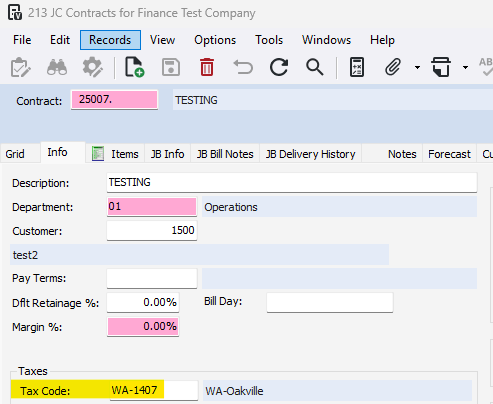
3-Go to the Items tab to set/override a tax code for each contract item
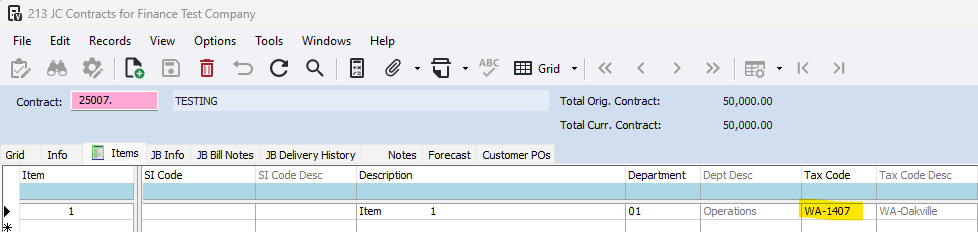
When the item is billed in Job Billing or Accounts Receivable, the Tax Code is automatically applied to each line, and the tax amount is calculated.
Project Manager Module Steps:
1-Go to Project Management>Programs>PM Contracts
2-On the Info tab, you can set a default tax code to apply to all contract items. You can click Yes on the pop-up to update existing items.
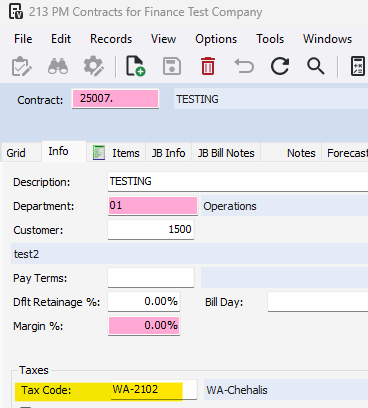
3-Go to the Items tab to set/override a tax code for each contract item
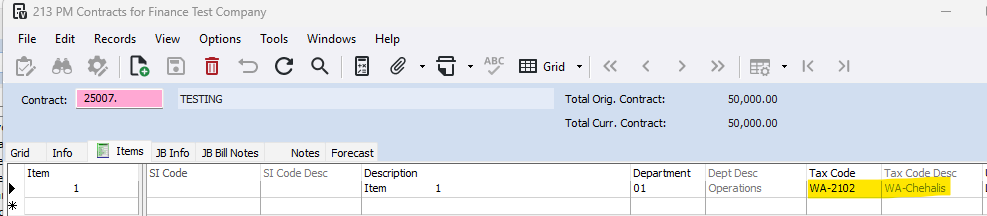
When the item is billed in Job Billing or Accounts Receivable, the Tax Code is automatically applied to each line, and the tax amount is calculated.
Was this article helpful?
That’s Great!
Thank you for your feedback
Sorry! We couldn't be helpful
Thank you for your feedback
Feedback sent
We appreciate your effort and will try to fix the article