AP Pay Control is used to group and organize invoices for payment processing. It allows you to assign a custom code to invoices and select specific groups for payment during AP Initialize Payments.
TABLE OF CONTENTS
Assigning Pay Control
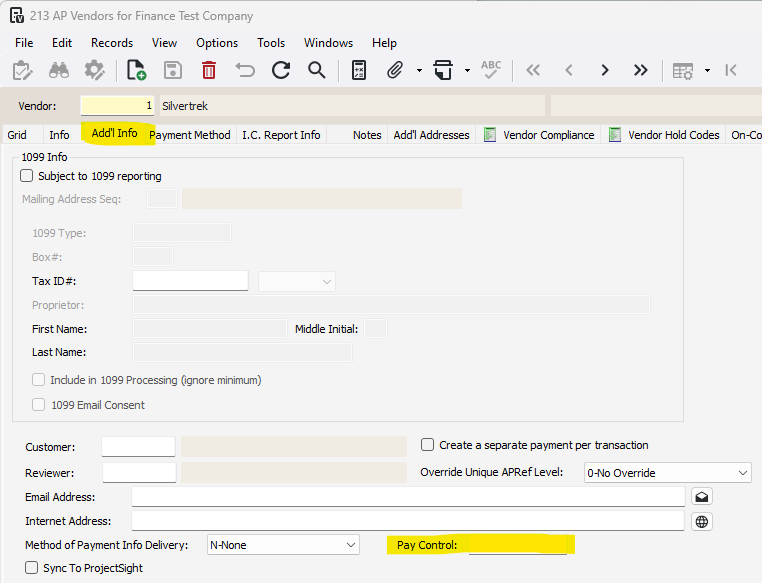
On a Vendor
1-Accounts Payable>Programs>AP Vendors
2-Select the vendor, go to the Add'l Info tab
3-Navigate down to the Pay Control field and enter a code
This will assign all future invoices for this vendor to be assigned the pay control code
On a Single Invoice
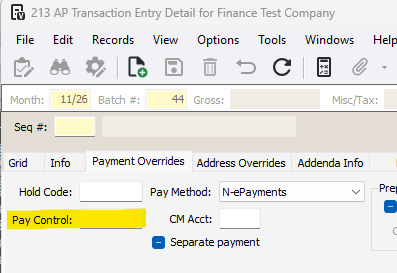
1-Go to Accounts Payable>Programs>AP Transaction Entry OR AP Unapproved Invoice Entry
2-While entering the invoice, go to the Payment Overrides tab
3-Navigate to the Pay Control field and enter a code
On a Subcontract
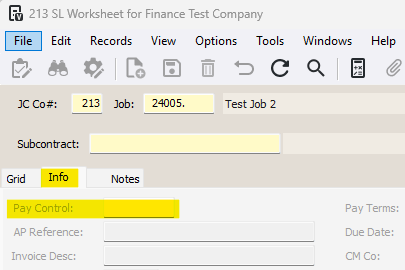
1-Go to Subcontract Ledger>Programs>SL Worksheet
2-Enter the Job and Subcontract
3-Go to the Info tab
4-Navigate to the Pay Control field and enter a code
How to use
1-Go to Accounts Payable>Programs>AP Payment Workfile
2-Check the Restrict by Payment Control checkbox and enter the code
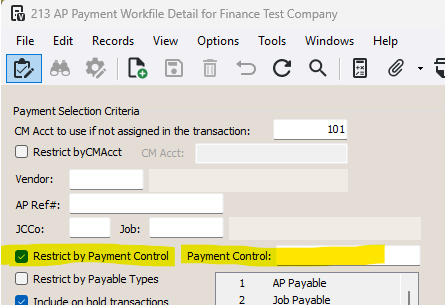
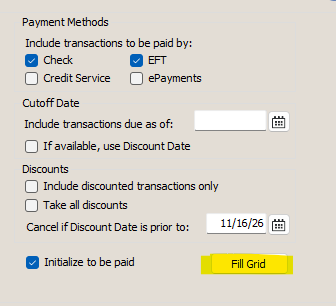
3-Press Fill Grid to add in all invoices under the Payment Control code
Was this article helpful?
That’s Great!
Thank you for your feedback
Sorry! We couldn't be helpful
Thank you for your feedback
Feedback sent
We appreciate your effort and will try to fix the article