AP Pay Categories are used to group and organize vendor invoices for payment processing. They allow companies to control which invoices are included in a payment batch, making it easier to manage payment priorities, separate payment types, and determine which invoices to pay.
Pay Category Setup
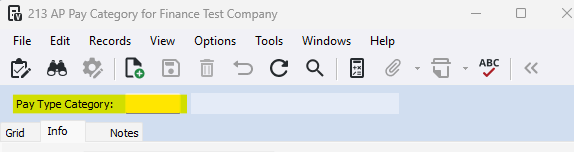
1-Go to Accounts Payable>Programs>AP Pay Category
2-Enter a unique numeric Pay Type Category
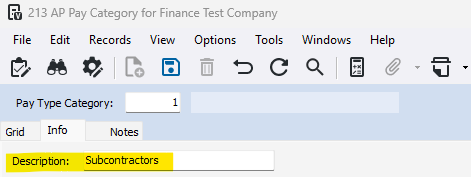
3-Enter a Description
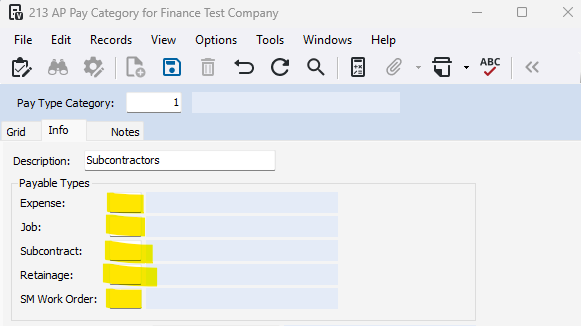
4-Set payable types to override
Assigning Pay Categories:
1-Go to Accounts Payable>Programs>AP Company Parameters
2-Go to the PayTypes/Discounts/ICR tab
3-Check the Using Payable Category checkbox
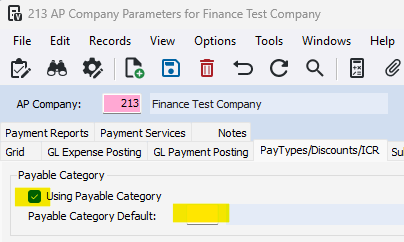
4-Select a Payable Category Default (Press F4 to view available categories)
On a Vista User:
1-Go to Viewpoint Administration>Programs>VA User Profile
2-Go to the Grid tab and select the user name
3-Go to the Info tab, and navigate to the Defaults section
4-Enter or press F4 to select available options
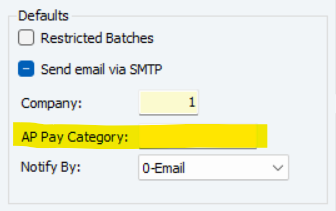
This pay category overrides the default pay category specified in AP Company Parameters and is the default pay category for this user when entering transactions in AP Transaction Entry, AP Recurring Invoices, AP Unapproved Invoices and PO Purchase Order Entry, as well as when updating subcontracts to AP (in SL Update to AP).
Was this article helpful?
That’s Great!
Thank you for your feedback
Sorry! We couldn't be helpful
Thank you for your feedback
Feedback sent
We appreciate your effort and will try to fix the article