1-Go to Accounts Receivable>Programs>AR Receivable Types
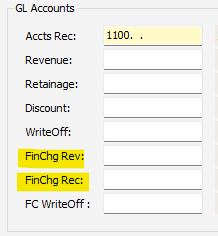
2-Enter GL Accounts for FinChg Rev and FinChg Rec
FinChg Rev: Enter GL account for finance charge revenue
FinChg Rec: Enter GL receivables account for finance charges
Was this article helpful?
That’s Great!
Thank you for your feedback
Sorry! We couldn't be helpful
Thank you for your feedback
Feedback sent
We appreciate your effort and will try to fix the article