The AP Payment History program is used to view and review payments that have been processed for vendors. It allows you to look up payment details, including check or EFT numbers, payment dates, amounts, and invoices paid.
1-Go to Accounts Payable>Programs>AP Payment History
2-Go to the Grid tab to view all payments
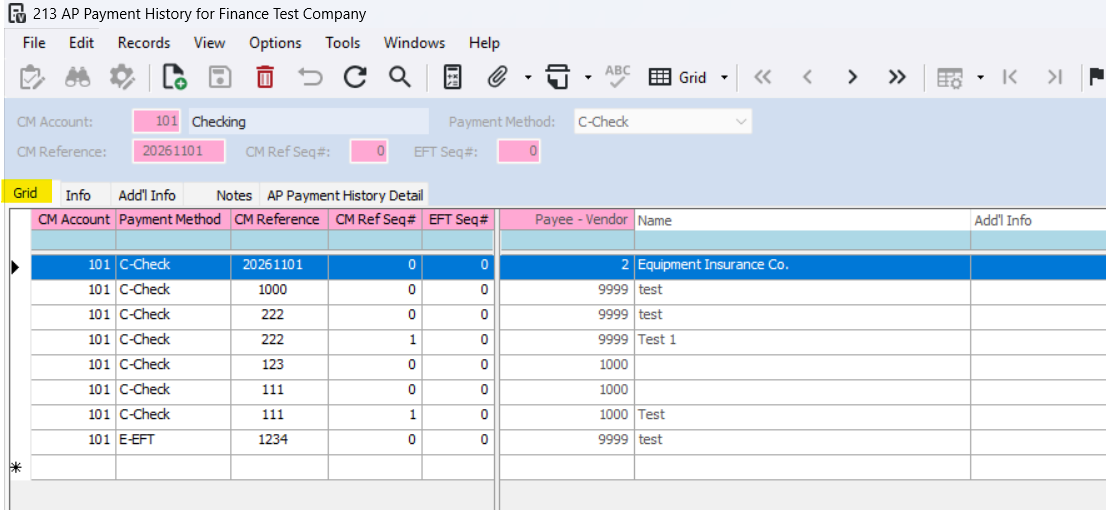
In the Grid tab, you can review useful payment information, including:
Vendor – Vendor associated with the payment.
CM Reference – Check or EFT number.
Payment Date – Date the payment was issued.
Payment Amount – Total amount paid.
Payment Type – Method of payment, such as check or EFT.
Payment Status – Information to help determine whether a payment has been voided.
3-To view payment detail of a particular payment, select the payment and go to the AP Payment History Detail tab
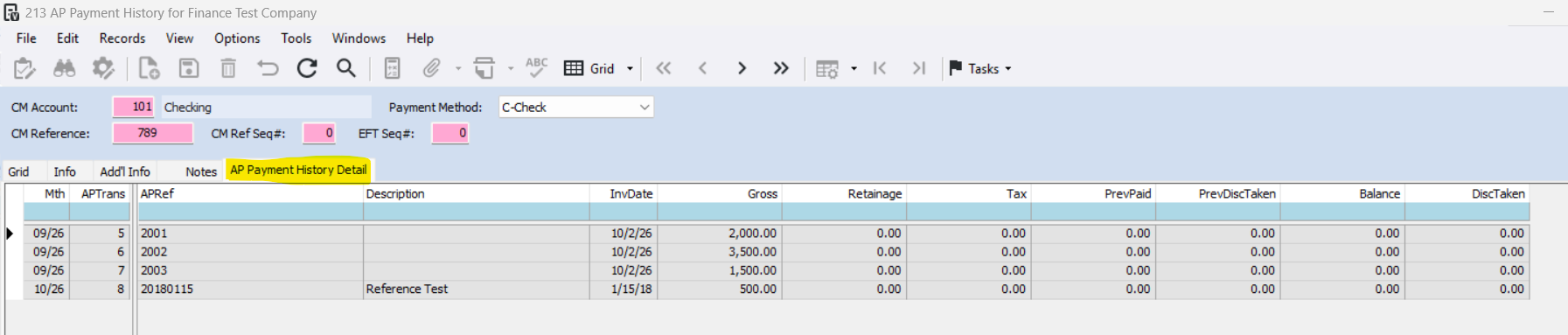
The AP Payment History Detail tab, provides a breakdown of the invoices associated with a selected payment.
Useful information includes:
Invoice Number – Identifies which invoices were paid.
Transaction Number – Shows the AP transaction associated with the payment.
Invoice Date – Date of the original invoice.
Amount Paid – Amount applied to each invoice.
Discount Taken – Any payment discounts applied.
Retainage Paid – Retainage amounts included in the payment, when applicable.
Was this article helpful?
That’s Great!
Thank you for your feedback
Sorry! We couldn't be helpful
Thank you for your feedback
Feedback sent
We appreciate your effort and will try to fix the article