Use SM Agreements to set up and manage service agreements, including budgets, billing schedules, amortization, and labor allocations.
Quick-add agreements can be done from the Agreements tab in SM Customers, but full setup requires SM Agreements.
New agreements start as quotes. Once approved, they become active agreements.
Open SM Agreements.
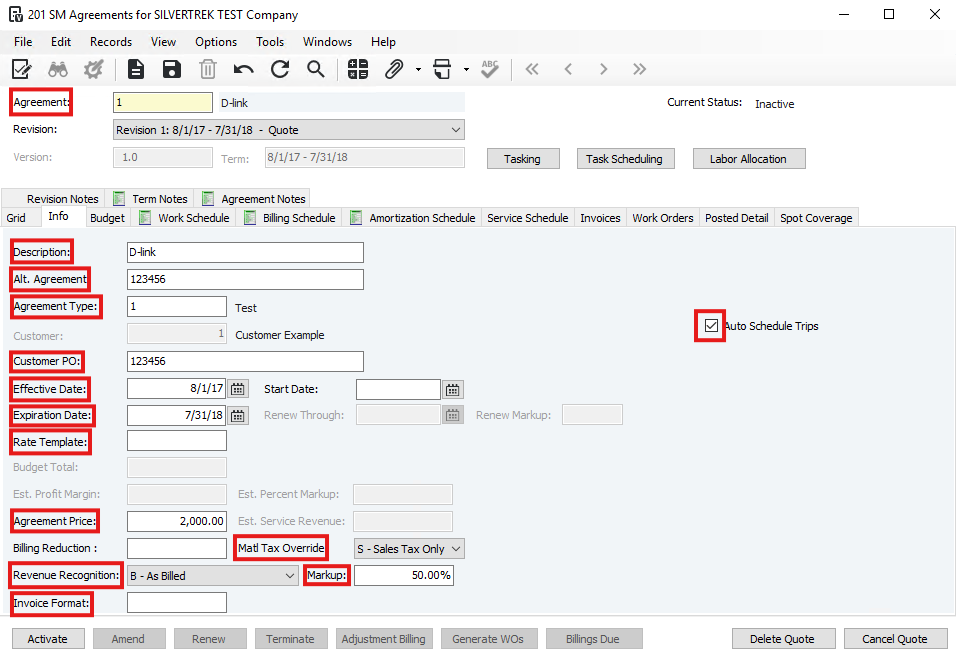
- In Agreement, enter N, New, or + to auto-assign a number, or enter manually.
- Enter a Description.
- (Optional) Enter Alt Agreement for the customer’s reference.
- Enter the Agreement Type.
- Enter the Customer.
- (Optional) Enter Customer PO.
- Enter Effective and Expiration Dates.
- If auto-renewal applies, enter Renew Through date and Renewal Markup %.
- Enter the Rate Template for work outside the agreement.
- Enter the Agreement Price (total charge for all services).
- Set Matl Tax Override (Blank, N, S, U).
- Set Tax Option Override (N, P, B, M, F).
- Choose Revenue Recognition method (B–As Billed, S–Amortize, or C–As Costs Incurred if enabled).
- Enter Margin % for revenue recognition.
- Specify Invoice Format (leave blank for default).
- Check Auto Schedule Trips to schedule service automatically.
- (Optional) Check Separate Scope Per Service Item for PM work orders.
- Set up Agreement Budget.
- Set up Services for the agreement.
- Set up a Billing Schedule.
- Set up an Amortization Schedule.
- Set up Labor Allocations.
- Activate the agreement.
Was this article helpful?
That’s Great!
Thank you for your feedback
Sorry! We couldn't be helpful
Thank you for your feedback
Feedback sent
We appreciate your effort and will try to fix the article